AI admin automation for dental, medical, and eye care practices

Your front desk,
automated.

Practiceflow handles the admin workflows your practice management software starts but never finishes. Recalls, confirmations, AR follow-up. Running automatically, every day.

No pitch. No commitment. We'll show you exactly what it does.

7.4%
Average no-show rate without automated recovery
$62K+
Fully loaded cost of one admin role in Vancouver
15–20 hrs
Front desk time lost to manual tasks per week
30–60 days
Average delay on manual insurance follow-up

The problem

Your front desk is running at full speed on tasks that shouldn't need a human.

Scheduling and confirmations
Phones ring all day. Appointment confirmations, reminders, reschedules, and no-show follow-ups all handled manually by your team.
Recall and reactivation
Overdue patients sit in a list. Reaching them requires manual phone calls and chasing. Time your office manager doesn't have.
Revenue leakage
Missed recalls, slow insurance follow-up, and AR that never gets chased. Revenue walks out the door because admin can't keep up.

Why it keeps happening

Too big to manage manually.
Too small to afford a full ops team.

Practices with 2–4 providers sit in an uncomfortable middle ground. You have enough volume that manual admin breaks down regularly. But you don't have the revenue to justify a full operations team.

Your current reality
Office manager handles scheduling, insurance, billing, and recall simultaneously
Recalls slip when the schedule gets busy
AR follow-up happens when there's time, which means it often doesn't
No-shows create gaps that don't get filled
Another hire means another $70K+ commitment
What it looks like with Practiceflow
Recall sequences run every week without anyone initiating them
Confirmations go out and get followed up automatically
AR gets chased on a schedule, not when someone remembers
No-shows trigger a rebooking sequence before the gap costs you
Your office manager focuses on the work that actually needs her

How it works

Three steps. No new software. Results in your schedule.

Step 1
Your PMS fires a trigger
A patient becomes overdue. A claim is denied. A balance ages past 30 days. Your PMS records it and stops.
→
Step 2
Practiceflow picks up
Reads the trigger, selects the right workflow, and starts the sequence automatically. SMS, email, or appeal draft.
→
Step 3
Results in your schedule
Appointments get booked. Balances get paid. Appeals get filed. Your office manager reviews outcomes, not tasks.
↓78%
Reduction in manual recall calls
2 hrs
Average daily time saved per office manager
14 days
To full setup and first results
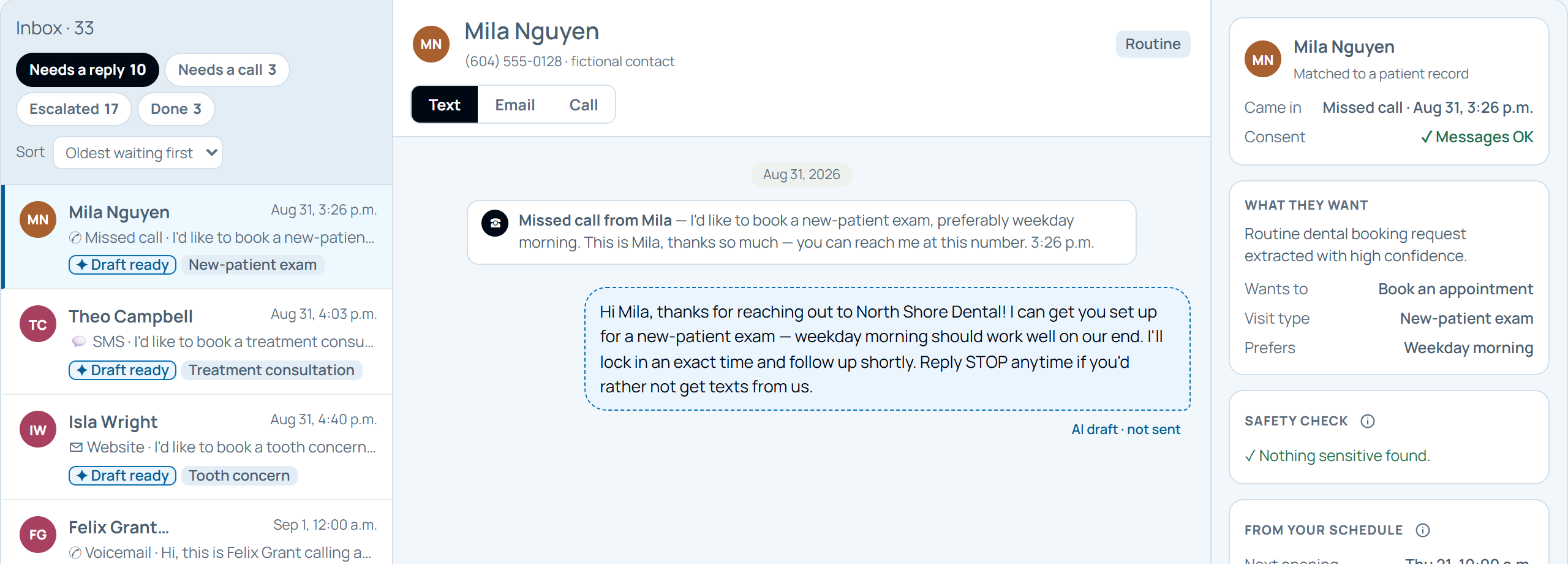
Practiceflow inbox showing a missed call from a patient and an AI-drafted reply marked not sent, waiting for staff approval
Missed call captured
AI drafts, you approve
Consent checked
How it works

Your PMS starts it. Practiceflow finishes it.

Your practice management software does a lot. What it can't do is handle what happens after the first trigger fires.

  1. Your PMS
    A recall comes due, a claim is denied, a balance ages.
  2. Practiceflow
    Sorts it, drafts the message and flags the exceptions.
  3. Your team
    Approves the draft, edits it or writes their own.
  4. Result
    Appointment booked. Balance paid. Appeal filed.
TaskWhat your PMS does todayWhat Practiceflow does instead
Recall sequencesSends one automated reminder→Runs a personalised multi-step sequence, handles replies, books the appointment
Appointment confirmationFires a reminder 48 hours out→Monitors response, follows up on silence, offers rebooking if cancelled
AR follow-upGenerates an overdue list→Runs tiered outreach by balance age and escalates when needed
Insurance denialsMarks the claim as denied→Reads the denial reason, drafts the appeal, flags it for your 30-second approval
Morning huddle prepGenerates a day sheet→Pulls schedule, unconfirmed appointments, AR and recalls into a two-minute brief

What gets automated

The tasks your team does every day that shouldn't require a person.

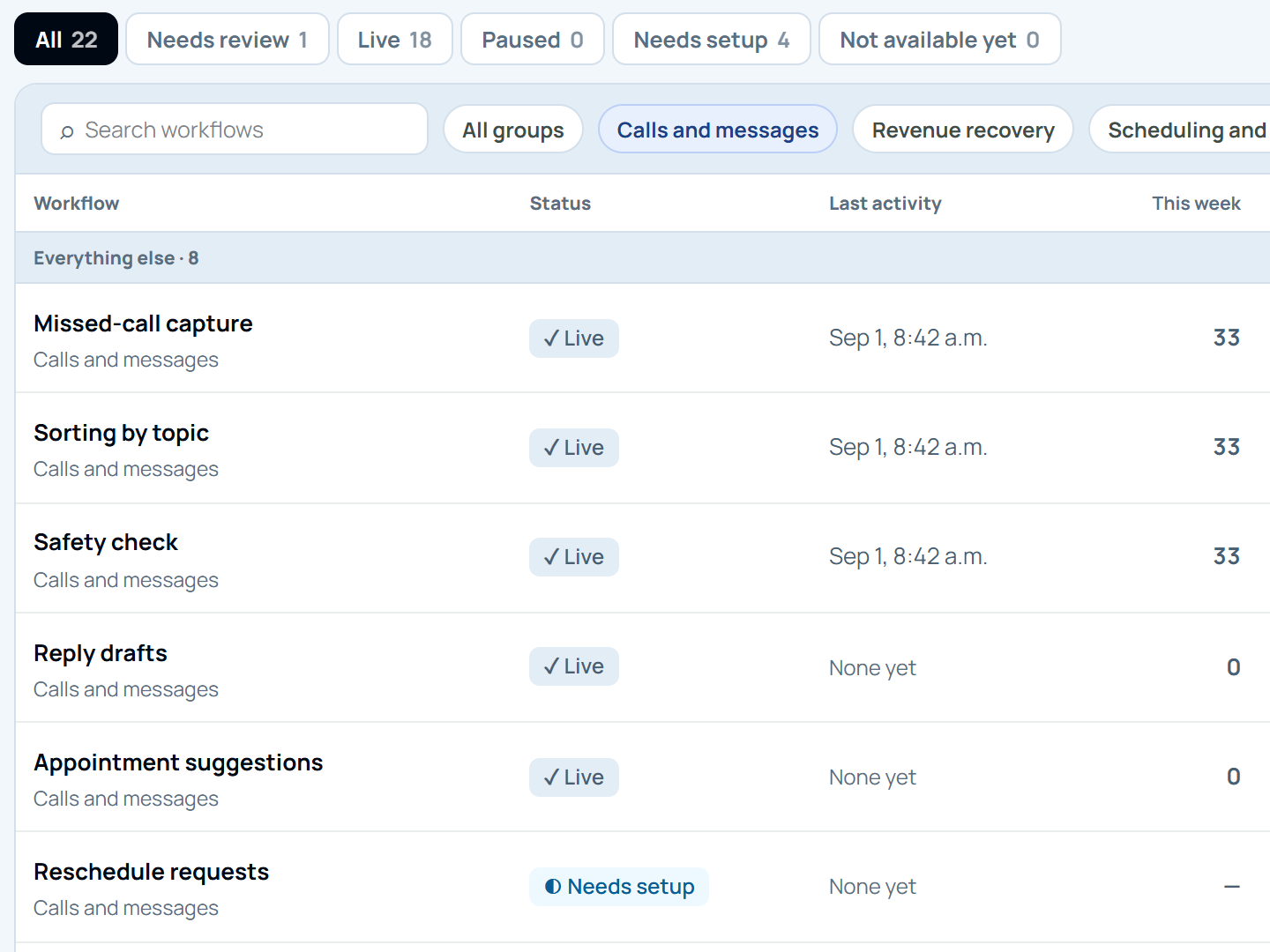
Practiceflow workflows filtered to calls and messages: missed-call capture, sorting by topic and safety check running live, with reply drafts, appointment suggestions and reschedule requests listed
Runs every day
Every item counted
Setup gaps flagged
01
Recall sequences
Patients due for a recall — a hygiene visit, an eye exam, or an annual check-up — get a personalised outreach sequence. No manual calls. No list to work through. Appointments get booked.
02
Appointment confirmation
Confirmations go out. Non-responses get followed up. Cancellations trigger a rebooking sequence. Your schedule fills itself.
03
AR follow-up
Overdue accounts get tiered outreach based on how long the balance has been outstanding. Escalation built in.
04
Insurance denial drafting
When a claim gets denied, Practiceflow reads the reason, drafts the appeal, and flags it for your office manager to review in under a minute.
05
Morning huddle prep
Every morning before the first patient, your team gets a two-minute brief covering the schedule, unconfirmed appointments, outstanding AR, and recalls due this week.
06
Treatment plan follow-up
Patients who left without booking their next treatment get a personalised follow-up sequence. Timed appropriately. Written in your practice's voice.

AR follow-up in action

Chased automatically. Escalated when it matters.

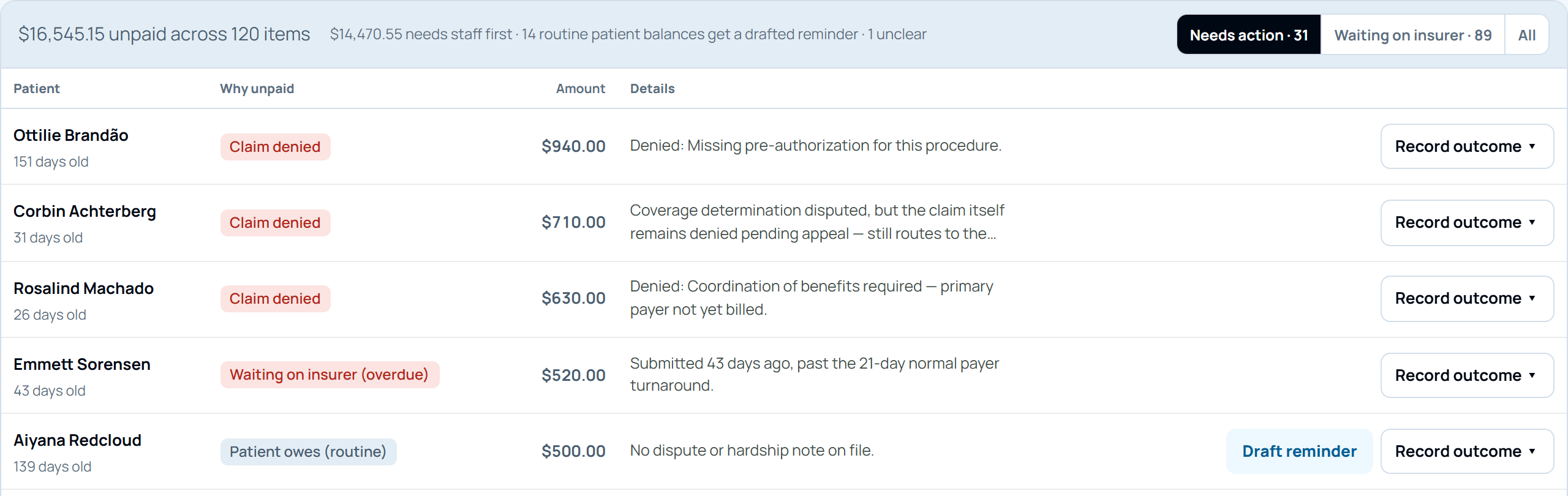
Every unpaid balance shows why it's unpaid. Routine balances get a drafted reminder. The rest go to your team first.

Practiceflow unpaid balances list showing why each balance is unpaid, such as a denied claim or an overdue insurer, with Draft reminder and Record outcome actions
Why it's unpaid, up front
Reminder drafted, not sent
Your team records the outcome

The morning brief

Ready before your first patient arrives.

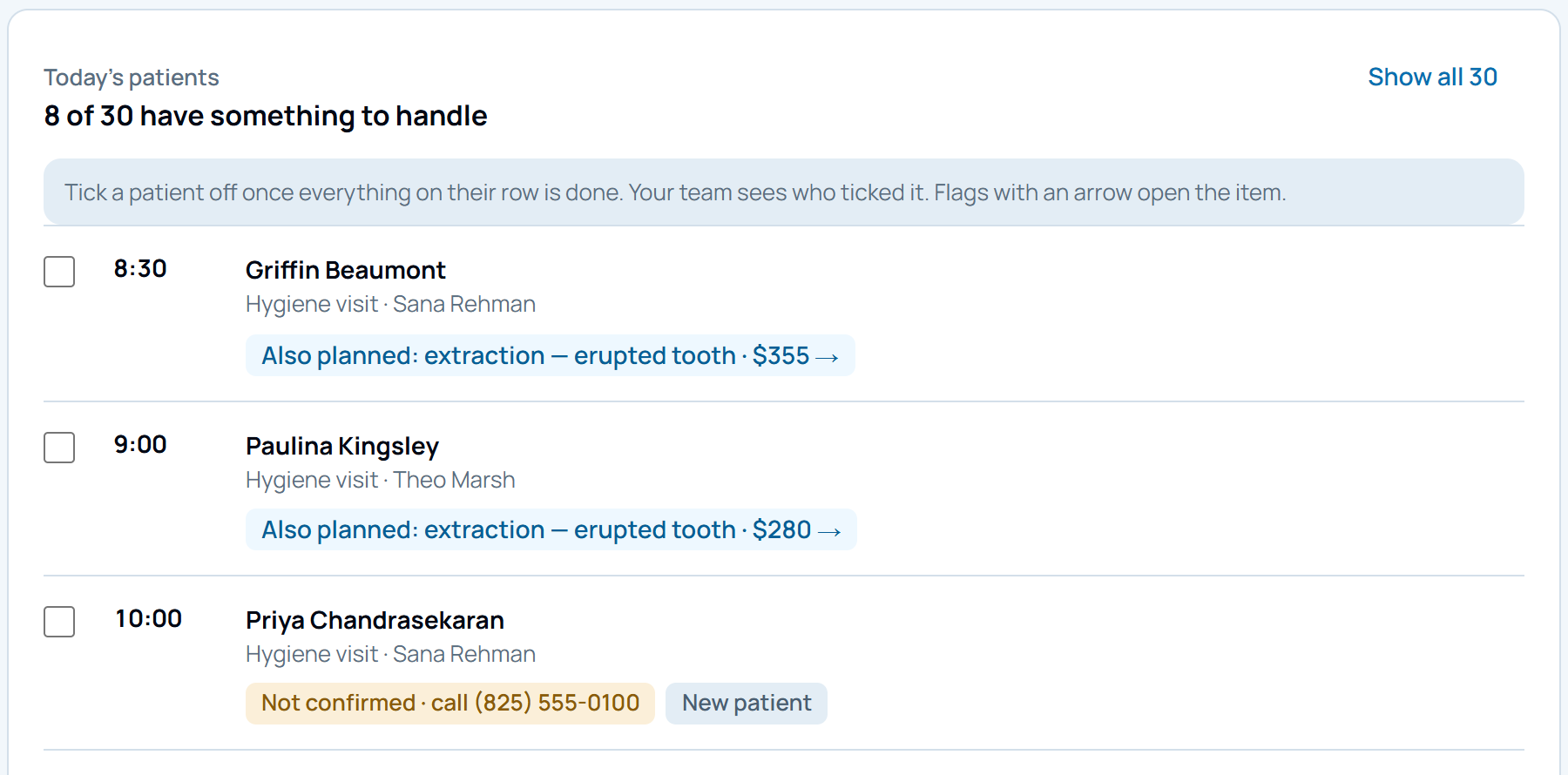
Every morning at 7:47am, your office manager gets a two-minute brief. No pulling reports. Everything that needs attention, already organised.

Practiceflow morning brief listing today's patients, with flags for planned treatment, an unconfirmed appointment and a new patient
Treatment still to book
Unconfirmed, with the number to call
Tick off when done

Built for healthcare

Built for healthcare. Designed for trust.

Everything a dental practice needs before letting a new tool near patient data.

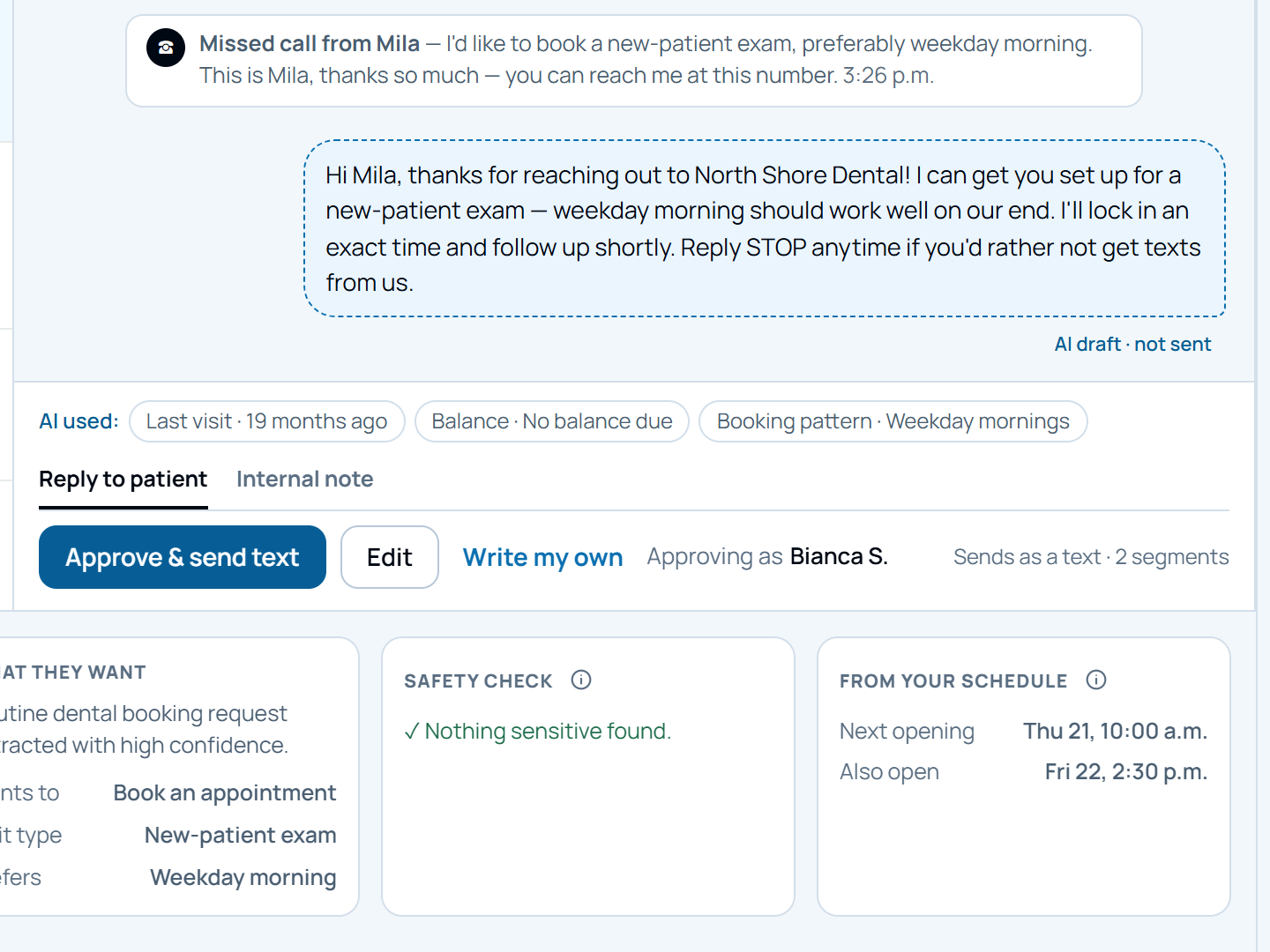
An AI-drafted reply marked not sent, with Approve and send, Edit and Write my own controls, and a safety check showing nothing sensitive found
AI drafts, you approve
Nothing sends on its own
Safety checked
Privacy-first by design
Built around Canadian privacy principles, with data hosted in Canada. Formal compliance review is completed before any pilot goes live with real patient data.
Alongside your PMS
Reads from your existing software. Nothing is replaced. Nothing is migrated.
You approve everything
No automation runs without visibility. All outreach is reviewable before it sends.
Admin workflows only
No clinical decision-making. No diagnosis. Strictly scheduling, billing, and communication.

How to get started

We're looking for a small group of dental, medical, and eye care practices in Vancouver to pilot this at no cost.

Practiceflow is in active development. We're working directly with a small number of independent practices to build the right product before we launch publicly. Full setup, configured around your workflows, at no charge.

What we ask from you
→A 30 to 45 minute discovery call to map your workflows
→One or two follow-up sessions on your schedule
→Honest feedback on what works and what doesn't
→Permission to observe a few admin processes
→No financial commitment at any point
What you get in return
✓Full setup and configuration at no cost
✓A pilot built around your specific pain points
✓Ongoing support throughout the pilot period
✓Direct input into what we build next
✓First access before public launch
Your office manager shouldn't still be doing this manually.
Book a 20-minute call. We'll show you exactly what Practiceflow automates, how it works alongside your existing software, and what the pilot looks like for a practice your size.
Book a call →